
Experian®
ExperianFinance
4.7207.64K Reviews
- Version
- 4.2.37
- Installs
- 10.00M
- Age Rating
- Everyone
Screenshots

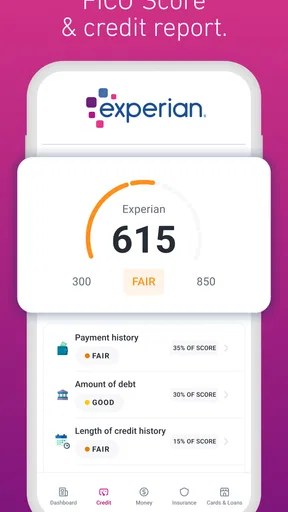
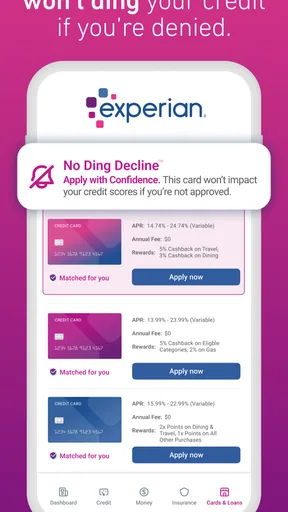

Our Review of Experian®
 Analysis by Appyee
I treat a credit app as a regular check-in tool, not a substitute for reading statements or making a budget. That distinction matters with Experian®: it can help me pay attention to changes in my credit, but the useful part comes from building a calm routine around what it shows. I would open it with a specific question in mind—has something changed, what should I understand, or what step do I want to consider? That keeps a quick check from turning into an anxious scroll through financial information.
A baseline routine that stays useful
My most practical approach is to check the dashboard at a consistent time, note the score and any change, then look at the explanation rather than guessing at the cause. Credit scores can move for reasons that are not obvious from a single glance. I would compare what the app displays with my own recent activity and account records before deciding that a particular purchase or payment caused a change.
The app is free, and Experian is the developer behind it. That makes it an easy starting point for someone who wants a regular view of credit without committing to a paid budgeting service. Its finance focus is narrower than a full money-management app: I would use it to follow credit and learn about credit-related choices, while keeping a separate budget or banking tool for day-to-day cash flow.
For a first-time user, I would avoid trying every screen at once. Start with the score and report view, understand how often the information is refreshed, and then explore alerts and educational material. A simple routine is more valuable than checking repeatedly, especially because a score is a snapshot rather than a complete measure of financial wellbeing.
Settings and habits worth checking
After getting comfortable with the main screen, I would review which alerts are available and decide which ones are genuinely useful to me. Alerts can draw attention to a notable change, but frequent notifications can also create noise. A good habit is to treat an alert as a prompt to review the underlying details inside the app and, when relevant, verify them against account statements—not as proof that something is wrong.
I would also make time for the identity-related options and information rather than assuming that installing a finance app automatically handles every security concern. Monitoring can help flag activity, but it does not replace careful password practices, checking financial accounts directly, or contacting the appropriate institution if I spot an unfamiliar transaction. The useful trade-off is awareness: the app may help me notice a concern sooner, while I still need to take the follow-up steps.
The educational section works best when I use it to answer a question I already have. If I am unsure how a credit factor works, I can read about it before making a decision instead of treating a general tip as a personal prescription. I would be cautious about changing a financial plan just to chase a score movement; borrowing, paying down debt, or opening an account should make sense for my circumstances beyond the number on the dashboard.
Faster patterns for real decisions
A realistic use case is preparing to review a major expense. Before discussing a loan or a new card, I could check the current credit picture, read any recent change information, and use the simulator to explore a hypothetical scenario. That gives me a more informed set of questions to take to a lender, but it is not a promise of approval or a substitute for the lender’s own assessment.
The simulator is most helpful when I change one assumption at a time. If I test paying down a balance and opening a new account in the same imagined scenario, it becomes harder to understand which change is associated with the result. I would use it to compare possibilities, then remember that projections are planning aids—not guaranteed forecasts of what will happen to my score.
Another useful pattern is to keep a short personal note outside the app when I take a meaningful credit action, such as paying down a balance or applying for an account. When I check again later, that note can help me distinguish a real pattern from a guess based on memory. I would not record sensitive account details in an unsecured note; the point is simply to remember the date and general action.
Where it fits—and where it does not
Compared with checking a score through a bank, card issuer, or another credit-monitoring service, Experian gives me a dedicated place to explore credit information and related learning. Those alternatives may be more convenient if I already manage an account there, while this app makes more sense when I want a separate credit-focused view. I would not assume that two services will display identical numbers or update at the same moment; differences can reflect the information and timing each service uses.
It is also not a complete replacement for a budgeting app. Someone trying to categorize spending, plan bills, or track cash across everyday accounts may be better served by a tool built around those tasks. Experian’s appeal is strongest for people who want to understand their credit position, keep an eye on changes, and learn what different choices could mean. If credit monitoring is not a priority, its extra screens may not justify another app on the phone.
People who are already comfortable reading reports may find the educational material basic, and users who expect a score to explain every financial decision may find the experience too narrow. I would also keep expectations measured around identity protection: alerts are useful signals, not a guarantee that all suspicious activity will be detected or prevented. That is a meaningful limitation, but it does not make monitoring pointless; it simply defines what the tool can and cannot do.
Who will get the most from it
I think it suits someone new to credit who wants a straightforward place to begin, as well as someone who has established credit but wants a simple check-in habit. The plain dashboard and educational content can make the subject less intimidating. The app is available at no cost, is rated for Everyone, and has a 4.7 average from around 697,000 ratings, which suggests broad appeal without telling me whether it will fit any one person’s needs.
It may be a poor fit for anyone who prefers not to share personal information with a credit-monitoring service, or who wants all financial activity consolidated into one budgeting interface. Before signing up, I would think about whether I am comfortable creating an account and providing the details needed to access credit information. If my main need is simply to see balances and recent purchases, checking directly with my financial institutions may be the more focused choice.
The app has been available since May 12, 2016, and its current version is 4.2.13. It requires Android 8.0 or later where applicable, so I would check compatibility before planning to use it on an older device. It has passed 10 million installs, but popularity is only one consideration; the better test is whether its credit-focused workflow matches the way I manage money.
One question people often have is whether the score should be treated as the number a lender will use. I would not rely on that assumption. A lender can assess an application using its own criteria and information, so I treat the app’s display as a helpful reference point rather than a guaranteed lending outcome. The practical next step is to review the underlying information and ask a lender which factors matter for the product I am considering.
Another reasonable question is whether I need to pay to get value from it. The app itself is free, and the basic monitoring and learning experience can be useful without upgrading. The premium option mentioned in the app may appeal to someone who wants more detailed reports or insights, but I would first use the free experience long enough to identify a specific gap. Paying for more detail is only worthwhile if that detail changes how I plan or act.
If I receive an alert that looks concerning, I would not panic or assume the app has resolved the issue for me. I would open the relevant information, check my records, and contact the appropriate financial institution or reporting service if something appears unfamiliar. That measured response is more useful than reacting to a notification alone, and it keeps monitoring in its proper role: helping me notice and investigate.
Getting Started with Experian
First off, setting up Experian® was a breeze. The app is available on both Android and iOS, so whether you're an Apple enthusiast or an Android loyalist, you're covered. I downloaded it from the Play Store, and within minutes, I was ready to explore.
Signing up was straightforward. I just entered some basic information—name, address, and a few other details. Then, voilà! I was in. The interface is clean and intuitive, which is always a plus. You don't want to be fumbling around trying to figure out where everything is, right?
Features That Stand Out
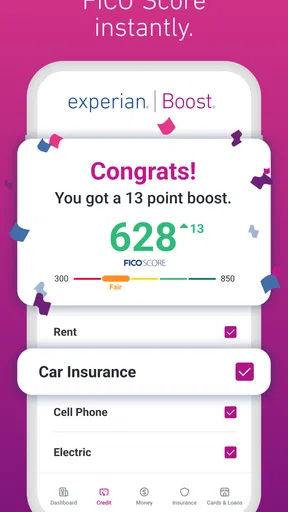
One of the first things I noticed was the free credit report and score feature. I mean, who doesn't want to know their credit score without forking over cash? This is updated every 30 days, giving you a regular snapshot of where you stand financially.
Another neat feature is the credit alerts. These are like little watchdogs that keep an eye on your credit activity. If there's any significant change, you'll get notified right away. It's like having a financial guardian angel!
Oh, and let's not forget about the credit score simulator. This tool lets you play around with different scenarios—like what happens if you pay off a loan or open a new credit card. It's a great way to see how your actions might affect your score down the line.
User Experience and Navigation
Now, onto the user experience. Navigating through the app is pretty smooth. The main dashboard gives you a quick overview of your credit score, recent changes, and other financial insights. It's all laid out in a way that even if you're not a financial expert, you can make sense of it.
I also found the educational resources really handy. There's a section with articles and tips on how to improve your credit score, manage debt, and so much more. It’s like having a mini financial advisor in your pocket!
What I Loved the Most
One thing that really stood out to me was the identity theft protection. In today's world, where everything is digital, it's nice to know there's a feature dedicated to keeping your personal information safe. The app monitors for suspicious activity and alerts you if anything fishy pops up.
Plus, if you're looking to get serious about your credit game, there's an option to upgrade to their premium services. This gives you access to more detailed reports and insights. I haven’t felt the need to upgrade yet, but it's good to know the option is there.
Wrapping It Up
All in all, I'd say Experian is a solid choice for anyone wanting to take control of their financial health. It's user-friendly, packed with useful features, and offers peace of mind with its security measures. Whether you're trying to boost your credit score or just keep tabs on your financial standing, this app has got you covered.
So, if you're ready to get serious about your financial journey, I'd recommend giving Experian a shot. It's not just about monitoring your credit score; it's about empowering you to make informed financial decisions. Happy credit scoring!
Privacy and Permissions
See what permissions an app requests and how it handles your data.
- Location
- approximate location (network-based), precise location (GPS and network-based)
- Phone
- read phone status and identity
- Camera
- take pictures and videos
- Wi-Fi connection information
- view Wi-Fi connections
- Device ID & call information
- read phone status and identity
- Other
- view network connections, change network connectivity, expand/collapse status bar, full network access, run at startup, prevent device from sleeping, read Google service configuration
Verdict
Strengths of Experian®
- User-friendly interface enhances navigation.
- Offers free credit score tracking monthly.
- Comprehensive identity theft protection tools.
- Real-time credit monitoring alerts.
- Customizable notifications for financial updates.
Limitations of Experian®
- Some features require premium subscription.
- App may have occasional sync issues.
- Limited to US users only.
- Customer service response can be slow.
- Notifications can be overwhelming at times.
Similar Picks in This Category
View All
Google Wallet
Google LLC4.3

Airtel: Recharge, Bank & Loans
Airtel4.0

PayPal - Pay, Send, Save
PayPal Mobile4.2

DANA Indonesia Digital Wallet
PT Espay Debit Indonesia Koe4.5

Binance: Buy Bitcoin & Crypto
Binance Inc.4.8

Cash App
Block, Inc.4.7
Frequently Asked Questions
What is Experian® and what does it do?
Experian® is a global information services company that provides credit reporting and monitoring services. The app allows users to check their credit scores, monitor their credit reports, and receive alerts about any changes or potential fraud. It's a valuable tool for anyone looking to manage their financial health and security.
Is the Experian® app free to use?
The Experian® app offers both free and premium features. Users can access their credit score and basic monitoring for free. However, advanced features such as detailed credit reports, identity theft protection, and enhanced monitoring require a paid subscription. It's important to review each plan to determine which suits your needs before downloading.
How secure is my information with Experian®?
Experian® employs robust security measures to protect user data, including encryption and secure servers. The app is designed to ensure your personal and financial information is kept confidential. However, users should also practice safe habits, such as using strong passwords and enabling two-factor authentication for added security.
Can I dispute errors on my credit report through the Experian® app?
Yes, the Experian® app provides users with the ability to dispute errors directly from their mobile devices. This feature simplifies the process by allowing you to submit disputes and track their status within the app. Ensuring your credit report is accurate is crucial for maintaining a healthy credit score.
How does Experian® help in improving my credit score?
Experian® offers tools and resources that can aid in improving your credit score. Features like personalized insights, credit score simulators, and educational content help users understand the factors affecting their scores. By following their recommendations, such as paying down debt or addressing errors, you can work towards a better credit rating.
